
There is a point where a simple idea can suddenly become much heavier than it needs to be.
Maybe you start with something innocent enough:
I want to build a website that can eventually make money.
Then the vocabulary arrives.
Domains. Hosting. WordPress. Plugins. SEO. Search intent. Email funnels. Affiliate links. Analytics. Conversion rates.
One person tells you that you need a complicated sales funnel. Another insists you need to be posting videos every day. Someone else has a seventeen-tool software stack that supposedly makes the whole thing work.
Before long, you’re no longer thinking about building a useful website.
You’re trying to understand an entire industry.
That is where many beginners stall.
The strange part is that the basic model is nowhere near as complicated as it first appears.
A money-making website can be built around a remarkably simple chain:
Choose an audience → solve useful problems → publish helpful content → attract visitors → build trust → recommend relevant solutions → earn revenue.
Everything else is infrastructure.
The domain gives the website an address. Hosting keeps it online. WordPress helps you publish. SEO helps the right people discover you. Email gives you a way to stay in touch.
But none of those pieces are the business by themselves.
The business begins when a real person arrives with a real problem and finds something genuinely useful waiting for them.
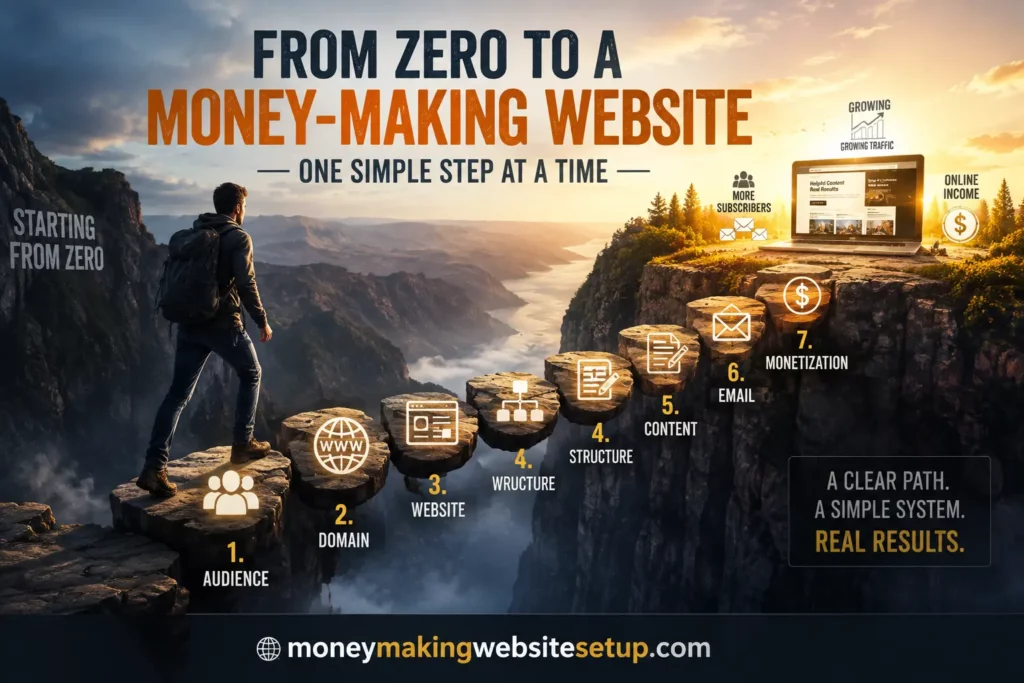
This guide breaks down a simple money-making website setup for beginners into seven practical steps. No coding background required. No need to turn yourself into a technical expert first.
You just need to understand what each piece is supposed to do.
Quick Answer: How Do You Set Up a Money-Making Website?
A beginner can build a money-making website by following seven basic steps:
- Choose a specific audience and profitable topic.
- Register a simple, memorable domain name.
- Set up web hosting and a content management system such as WordPress.
- Create the essential pages and a clean website structure.
- Publish useful content based on real search intent.
- Build an email list so visitors can become a long-term audience.
- Monetize with relevant affiliate offers, products, services, memberships, or advertising.
The important thing to understand is that the website itself does not magically create income.
It creates the conditions in which income can happen.
Attention comes first.
Then trust.
Then action.
That order matters more than almost anything else in this guide.
What Is a Money-Making Website, Really?
A money-making website is simply a website designed around an audience, a set of problems, and a realistic path from attention to revenue.
That path can take many forms.
A woodworking site might publish project guides and recommend tools, plans, or training.
A gardening site might attract readers through how-to content and monetize with affiliate products, digital guides, or advertising.
A finance website might build an email audience and recommend relevant services.
A freelancer might publish expert content that quietly brings in consulting leads.
Different surface. Same underlying engine.
The Simple Business Model Behind a Profitable Website
Strip away the software, branding, themes, dashboards, and jargon, and the model usually looks something like this:
Search demand → useful content → visitor → trust → conversion opportunity → revenue
That is the spine of the entire business.
If the audience has no meaningful problem, there is little urgency.
If nobody can discover your content, the website remains invisible.
If the content is thin, generic, or unhelpful, trust never gets a chance to form.
And if there is no logical next step—no product, service, email offer, membership, referral, or other monetization path—traffic may remain just that.
Useful, perhaps. Encouraging, maybe.
But not yet a business.
One Visitor Is Enough to Understand the Model
It helps to stop thinking in millions of pageviews for a moment.
Imagine one person.
They search for:
“best beginner woodworking tools”
They land on a detailed guide that actually helps them understand what they need and what they can safely ignore.
While reading, they notice a free beginner woodworking checklist.
They subscribe.
A few days later, they receive another helpful email. Then another.
Eventually, one email recommends a woodworking resource that fits the problem they are trying to solve.
They buy it.
The website owner earns a commission.
That entire journey began with one search.
One question.
One useful page.
That is the model in miniature.
Scale it across hundreds of relevant topics, and suddenly the idea of a content-based website starts to make a lot more sense.
Recommended reading: The Evergreen Authority Engine: How One Content Website Can Generate Traffic, Leads, and Passive Income for the Next Decade
The 7-Step Money-Making Website System
Before we go deeper, here is the entire structure in one place:
| Step | What You Build | Why It Matters |
|---|---|---|
| 1 | Audience and niche | Determines who you help |
| 2 | Domain | Gives the website an identity |
| 3 | Website platform | Creates the technical foundation |
| 4 | Essential site structure | Makes the website usable and trustworthy |
| 5 | Content library | Creates opportunities for discovery |
| 6 | Email list | Turns temporary visitors into an audience |
| 7 | Monetization | Connects attention with revenue |
What is missing from that list is just as important.
You do not need custom programming.
You do not need expensive branding.
You do not need ten social media accounts.
You do not need a page builder with 300 design options.
You do not need a complicated funnel before you have people entering it.
Those things may become useful later.
First, build something that works.
Step 1: Choose a Website Idea With a Real Path to Revenue
Your first decision is not your domain.
It is not your theme.
It is not which hosting company has the nicest dashboard.
Your first real decision is simpler:
Who are you helping, and what are you helping them with?
That is the beginning of your niche.
Start With Problems, Not Products
Beginners often start by asking:
What can I sell?
That question is understandable, but it puts the cart several miles ahead of the horse.
A better question is:
What is this audience already trying to solve?
Suppose you build a site around home coffee brewing.
People might search for:
- how to make stronger coffee
- best coffee grinder for beginners
- why espresso tastes bitter
- French press coffee ratio
- how to clean a coffee grinder
- espresso machine vs. coffee maker
- best beans for cold brew
Look closely at those searches.
They are not abstract “keywords.”
They are moments.
Someone is confused.
Someone is comparing.
Someone is frustrated.
Someone is about to buy something.
That matters, because money tends to appear where problems, decisions, and solutions meet.
Look for the Intersection of Three Things
A healthy niche usually sits where three forces overlap:
Audience interest + recurring problems + commercial opportunity
You are looking for a subject with enough depth to grow.
Ask yourself:
- Are people repeatedly asking questions about this topic?
- Are there products, services, memberships, tools, or resources connected to it?
- Could I realistically publish dozens or hundreds of useful guides?
- Does the niche contain both informational and commercial search intent?
- Is the underlying demand likely to exist several years from now?
You do not need perfect answers.
You need enough evidence to say, Yes, there is something here.
Evergreen Niches Give You More Time
Trends can explode.
They can also vanish.
Evergreen niches move more slowly because they are tied to persistent human behavior.
People will keep wanting to:
- improve their homes,
- learn practical skills,
- make or save money,
- cook better,
- build things,
- grow gardens,
- care for pets,
- improve their careers,
- pursue hobbies,
- understand technology,
- solve everyday frustrations.
The specific tools and products change.
The underlying desires usually do not.
That makes evergreen topics attractive for websites built around long-term content.
Learn more: 27 Evergreen Website Ideas That Make Money Year After Year (Even If You Start With Zero Audience)
Do Not Turn Niche Research Into a Hiding Place
Research feels productive.
That is what makes it dangerous.
You compare niches.
Then you compare sub-niches.
Then you discover another keyword tool.
Then you make a spreadsheet.
Then you redesign the spreadsheet.
Three weeks later, nothing exists.
At some point, research has done its job.
Choose a viable direction and begin.
You are far more likely to create an advantage through execution than by discovering some secret niche nobody else has noticed.
Recommended reading: How to Choose a Niche for Affiliate Websites That Actually Converts (The Data-Driven Method Top Earners Don’t Talk About)
Step 2: Choose a Domain Name You Can Stop Thinking About
Once you know what the site is about, you need somewhere for it to live.
That means choosing a domain name.
This decision feels enormous when you are starting.
Usually, it is not.
What Makes a Good Domain Name?
A good beginner domain is generally:
- easy to spell,
- easy to remember,
- reasonably short,
- relevant to the subject or brand,
- easy to say aloud,
- difficult to misinterpret.
That is enough.
If the name needs a long explanation, it is probably making life harder.
If you have to say, “There are two hyphens, the word four is written as a number, and success has only one C because the other version was taken,” keep looking.
Simple tends to age well.
Does the Keyword Need to Be in the Domain?
No.
It can be useful if it fits naturally, but it is not a requirement.
A descriptive domain can tell people what the site is about immediately.
A broader brandable domain can give you more room to expand later.
Neither approach replaces the actual work.
Search engines have far more information available than your URL.
Your pages, headings, internal links, content topics, site structure, external references, and overall topical consistency all help communicate what the website is about.
Choose a sensible domain.
Then move on.
The website you build underneath it matters far more.
Step 3: Build the Technical Foundation Without Becoming a Tech Person
This is the stage that scares many beginners unnecessarily.
The words sound technical.
The process usually is not.
For a basic content website, you mainly need:
Domain + hosting + content management system
That is the core stack.
What Is Web Hosting?
Your domain is the address.
Hosting is the place where the website’s files and data actually live.
When someone visits your website, the hosting server sends the site to their browser.
You do not need to understand server architecture to choose a basic hosting plan.
For a beginner content site, look for practical things:
- straightforward setup,
- SSL support,
- backups,
- decent performance,
- reasonable security,
- responsive customer support.
You can learn the deeper technical details later if they ever become relevant.
Most will not be relevant on day one.
What Is WordPress?
WordPress is a content management system, often shortened to CMS.
A CMS lets you create and manage pages without manually coding everything from scratch.
You can publish articles, upload images, create categories, build navigation menus, install themes, and extend the site with plugins.
For someone planning to build a large content library, that matters.
The publishing process becomes repeatable.
You spend less time wrestling with code and more time working on the actual asset: the content.
Pick a Theme and Get Back to Work
Theme shopping can become another form of procrastination.
One theme has nicer buttons.
Another has a more impressive homepage.
A third has animations.
A fourth has twelve header layouts you will probably never use.
Meanwhile, there are still no articles.
Choose something clean.
Look for a theme that:
- works well on mobile,
- loads efficiently,
- keeps text readable,
- has straightforward navigation,
- does not overwhelm the content.
Design matters.
But early-stage websites usually do not fail because the border radius on their buttons was wrong.
They fail because nothing useful ever gets published.
Treat Plugins Like Tools, Not Collectibles
Plugins add functionality.
That makes them useful.
It also makes them easy to accumulate.
You install one for social sharing. One for animations. One for popups. One for forms. One for related posts. One because a YouTube video told you it was “essential.”
Before long, your simple website has become a technical ecosystem.
Install plugins when they solve a real problem.
Not because they exist.
A lean site is easier to understand, easier to maintain, and usually easier to troubleshoot.
Step 4: Build the Smallest Website That Looks and Feels Complete
You do not need fifty pages before launch.
You need enough structure that a real visitor can arrive, understand where they are, move around naturally, and trust that the site belongs to someone who cares about what they are doing.
That is a much lower bar than perfection.
Create the Essential Pages
Depending on your business model and where you operate, the site may need pages such as:
Homepage
Tell people what the website is about.
Do it quickly.
A visitor should not have to decode your mission statement.
About Page
Explain who the site helps, what it covers, and why it exists.
This does not need to become your autobiography.
It needs to give the website context.
Contact Page
Give people a reasonable way to reach you.
Simple is fine.
Privacy Policy
Explain relevant data collection and privacy practices.
Affiliate Disclosure
If affiliate relationships are part of the business model, disclose them clearly and appropriately.
Terms and Other Legal Pages
Requirements vary by country, jurisdiction, data practices, business structure, and monetization model.
Generic templates can be useful starting points, but they are not substitutes for individualized legal advice.
Navigation Should Feel Boringly Obvious
Good navigation rarely impresses anyone.
That is part of what makes it good.
People should know where to click.
If you ran a woodworking site, broad categories might look like:
Projects → Tools → Joinery → Workshop → Finishing
Simple.
Predictable.
Useful.
Clear navigation helps readers explore.
It also creates stronger structural relationships between related parts of the site.
Check the Site on Your Phone
Desktop design can be deceptive.
Everything looks spacious.
Then you open the same page on a phone and discover tiny text, squeezed buttons, giant images, and a menu that feels like solving a puzzle.
Check:
- font size,
- paragraph spacing,
- button size,
- forms,
- image scaling,
- navigation,
- general readability.
You are not trying to win a design award.
You are trying to make reading effortless.
Learn more: How to Build a Small Business Website for Beginners That Actually Brings Customers (Not Just Visitors)
Step 5: Publish Content People Were Already Looking For
This is where the website begins to gain a pulse.
Until now, you have mostly built infrastructure.
Content gives people a reason to find you.
But there is an important distinction.
You are not publishing because “blogs need content.”
You are publishing because someone, somewhere, is already searching for an answer.
Interesting reading: Simple Money-Making Website Setup for Bloggers: Launch the Essential Version in 24 Hours
Start With Search Intent, Not Just Keywords
A keyword tells you what someone typed.
Search intent tells you what they hoped would happen next.
That difference changes how you write.
Consider:
“how to build a woodworking bench”
That is probably instructional.
Now compare it with:
“best woodworking bench for small shop”
This person may be comparing products.
And:
“woodworking bench plans PDF”
That is more specific still.
The words reveal different moments in the decision process.
Your article should match the moment.
Understand the Main Types of Search Intent
Informational Intent
The person wants to learn something.
Examples:
- how does affiliate marketing work?
- what is a router table?
- how to sharpen a chisel?
These searches are often excellent for building trust and introducing people to your site.
Commercial Investigation
The reader is evaluating options.
Examples:
- best beginner web hosting
- table saw vs. track saw
- best email marketing software for bloggers
They may not be ready to buy yet, but they are getting closer.
Transactional Intent
The searcher is moving toward action.
Words related to buying, subscribing, signing up, downloading, ordering, or obtaining something often indicate this kind of intent.
Navigational Intent
The person wants to reach a particular website, company, product, or page.
Not every site needs to target every type equally.
But understanding the difference prevents you from writing the wrong page for the wrong search.
Long-Tail Keywords Are Often Where Beginners Find Their Footing
Big keywords are seductive.
“Woodworking.”
“Gardening.”
Huge topics. Huge traffic potential.
Also huge ambiguity.
A query like:
“how to set up a small woodworking shop in a one-car garage”
tells you far more.
You can see the space constraint.
You can infer the skill level.
You can anticipate the next questions.
Specific searches often create opportunities for more useful answers.
And useful answers are exactly what a new website needs.
Learn more: How to Find Buyer Intent Keywords That Consistently Generate Affiliate Commissions (Step-by-Step Guide)
Build a Library, Not a Junk Drawer
Imagine opening a cupboard and finding batteries, flour, paintbrushes, old receipts, three screws, and a winter glove.
That is what a random content strategy feels like.
One article about email marketing.
One about cryptocurrency.
One about blogging.
One about productivity.
One about dog food.
Technically, it is content.
Strategically, it is chaos.
A stronger site develops recognizable clusters.
A website about building an online business might gradually create sections around:
- niche selection,
- domain names,
- WordPress,
- SEO,
- keyword research,
- content creation,
- email marketing,
- affiliate marketing,
- website monetization,
- conversion optimization.
Now the articles reinforce one another.
The website begins to look less like a collection of posts and more like a body of knowledge.
Internal Links Should Answer the Reader’s Next Thought
Good internal linking feels almost invisible.
You mention choosing a domain.
The reader thinks:
How do I actually choose a good one?
There is the link.
You mention lead magnets.
The reader thinks:
What should mine be?
There is another.
That is how internal links should work.
Not as decoration.
Not as a quota.
As doors.
Recommended reading: Topical Authority Website Setup Strategy 2.0: The Entity-Driven SEO System Built for AI Search, Featured Snippets, and Generative Engines
Depth Matters More Than Word Count
A long article can be excellent.
It can also be exhausting.
A short article can be useful.
It can also be useless.
Length tells you almost nothing by itself.
The real question is:
Did the page solve the searcher’s problem completely enough?
Some topics need 1,200 words.
Others deserve 8,000.
Some genuinely require more.
Write until the problem is solved.
Then stop.
Step 6: Turn Passing Visitors Into People You Can Reach Again
This is one of the most overlooked parts of a beginner website.
Someone discovers you.
They read an article.
Maybe they genuinely like it.
Then they close the tab.
Gone.
That is normal.
Most visitors do not bookmark everything they enjoy. They do not remember every domain they visit. They may never return.
An email list gives the relationship a second chance.
Give People a Reason to Join
“Subscribe to my newsletter” is polite.
It is not always compelling.
A useful lead magnet gives people a concrete reason to exchange their email address for something helpful.
That could be:
- a checklist,
- a guide,
- a template,
- free plans,
- a mini-course,
- a resource sheet,
- a printable,
- a blueprint.
The strongest lead magnets usually fit the article naturally.
A person reading about building a first website might want a setup checklist.
A person reading about workbench construction might want printable plans.
The closer the fit, the less the opt-in feels like a marketing interruption.
The Email Funnel Can Stay Simple
You do not need a diagram with thirty-seven branches.
The basic flow can be:
Visitor → helpful article → relevant opt-in → subscriber → welcome emails → continued value → relevant recommendation
That is enough to begin.
What Should You Email People?
Start with the thing you promised.
Then keep helping.
A simple sequence might look like this:
- Deliver the resource.
- Help them get a quick result.
- Explain a mistake that often causes trouble.
- Teach something closely related.
- Introduce a useful solution.
There is a rhythm to this.
You are not hiding the fact that your website is a business.
You are simply earning the right to recommend something.
That distinction is felt.
Why Email Can Change the Economics of the Website
Search traffic is powerful.
It is also borrowed.
You do not control rankings.
You do not control algorithm updates.
You do not control what someone searches tomorrow.
With proper consent, email gives you a direct relationship with people who have already chosen to hear from you.
One article can therefore do more than generate one pageview.
It can start a relationship.
And relationships have a much longer shelf life than pageviews.
Recommended reading: Free Lead Generation Website Setup: The Exact System That Turns a New Website Into a Lead-Capturing Machine
Step 7: Give the Website an Economic Engine
At some point, there has to be a way for the business to make money.
Traffic alone does not do that.
Neither do pageviews.
Neither do email subscribers.
Those things create potential.
Monetization turns some of that potential into revenue.
Affiliate Marketing
Affiliate marketing is one of the simplest models for beginners to understand.
You recommend a relevant product or service through an affiliate relationship.
If someone completes a qualifying purchase or other action under the program’s terms, you may earn a commission.
The appeal is obvious.
You often do not need to:
- manufacture anything,
- ship products,
- handle payment processing,
- develop the main product,
- manage the underlying service.
Your job is usually to educate, compare, explain, recommend, or refer.
The key word is relevant.
A recommendation should feel like part of the solution.
Not like an advertisement that wandered into the wrong room.
Recommended guide: Easy Affiliate Website for Beginners Without Coding: A 24-Hour Setup and 30-Day Traffic Plan
Digital Products
You can also sell your own:
- ebooks,
- courses,
- templates,
- plans,
- printables,
- software,
- premium resources.
This gives you more control over pricing, positioning, customer experience, and margins.
It also gives you more responsibility.
You have to create the product.
Improve it.
Support it.
Market it.
For some people, that is a worthwhile trade.
Learn more: The Ultimate Digital Product Website Business Playbook: Build, Market & Scale to Six Figures
Services
Sometimes the content itself becomes the sales process.
A bookkeeping site can generate bookkeeping clients.
A design site can generate design work.
A copywriting site can bring in copywriting projects.
A consultant can publish enough useful material that prospects arrive already convinced they know what they are talking about.
That is a powerful position to be in.
Advertising
Advertising monetizes attention more directly.
As traffic grows, display ads can become a viable revenue stream depending on the niche, geography, ad platform, and audience behavior.
The tradeoff is visible.
Ads can slow pages down.
They can interrupt reading.
They can make a clean site feel crowded.
That does not make advertising bad.
It simply means the revenue comes with a user-experience cost that should be considered.
Memberships and Recurring Revenue
Recurring models include:
- paid communities,
- memberships,
- software subscriptions,
- recurring services,
- affiliate programs that pay recurring commissions.
The attraction is obvious.
One customer can potentially generate revenue over multiple billing periods.
But recurring does not mean permanent.
People cancel.
Programs change.
Markets shift.
Treat recurring income as a business model with retention dynamics, not as guaranteed passive income.
Recommended reading: Recurring Commission Affiliate Programs vs One-Time Commissions: Which Builds More Wealth Over Time?
Resist the Urge to Monetize Everything at Once
This is where beginners can accidentally turn a useful site into a carnival.
Affiliate links.
Ads.
Popups.
Course banners.
Consulting boxes.
Membership pitches.
Three lead magnets.
Four funnels.
All before the site has a meaningful audience.
Start with one primary path.
Get feedback.
Watch what people actually do.
Then expand deliberately.
How Much Does a Beginner Money-Making Website Cost?
There is no single number because the setup can be extremely lean or unnecessarily elaborate.
The important distinction is between what you need and what you merely could buy.
Essential Costs
Potential essentials include:
- domain registration,
- web hosting,
- necessary legal or business costs,
- possibly email software depending on your setup.
Optional Costs
Many things can wait:
- premium themes,
- expensive SEO platforms,
- advanced funnel software,
- premium page builders,
- branding packages,
- stock image subscriptions,
- advanced automation tools.
A useful filter is brutally simple:
Does this solve a problem I have right now?
If the answer is no, leave it alone.
There will always be another tool to buy.
How Long Does It Take for a New Website to Make Money?
This is the question almost everyone eventually asks.
And it deserves a better answer than either false optimism or cynical pessimism.
There is no universal timeline.
A site with an existing audience can generate sales quickly.
A site depending almost entirely on organic search may take much longer to develop meaningful traffic.
Your results can be influenced by:
- niche competitiveness,
- search demand,
- content quality,
- site structure,
- indexing,
- authority,
- reputation,
- backlinks and external references,
- conversion rates,
- monetization model,
- publishing consistency,
- algorithm changes,
- time.
That is why guaranteed income timelines should make you cautious.
Too many variables sit between publishing and revenue.
Early Progress Can Be Almost Invisible
This is where patience becomes difficult.
You publish.
Nothing obvious happens.
You publish again.
A page gets indexed.
Another starts receiving impressions.
One query appears at position 76.
Then another at 43.
A page gets its first click.
None of this feels dramatic.
It certainly does not feel like the glamorous version of online business.
But it is movement.
There is a difference between:
“The site is not producing meaningful traffic yet.”
and:
“The site is doing absolutely nothing.”
Those are not always the same statement.
Organic search often develops quietly before it becomes noticeable.
Think in Libraries, Not Individual Articles
One article is a page.
A hundred connected articles begin to feel like an asset.
That difference matters.
Imagine publishing one genuinely useful guide.
Then ten.
Then fifty.
Then a hundred.
Then more.
Every useful page becomes another possible entrance.
Not every article will perform.
Some will barely move.
Others will rank for searches you never anticipated.
A small number may eventually account for a disproportionate share of the site’s traffic.
That is normal.
The real strength is the cumulative surface area.
A larger coherent content library can answer more questions, cover more entities, satisfy more search intents, and create more internal pathways between related ideas.
You stop depending on one page.
You start building an ecosystem.
The Beginner Mistakes That Quietly Make Everything Harder
Most websites do not collapse because of one dramatic mistake.
They get slowed down by smaller decisions repeated for months.
Mistake #1: Designing Forever Instead of Publishing
Design matters.
But your perfect homepage cannot rank for 200 useful long-tail searches if the supporting content does not exist.
Get the basics right.
Then publish.
You can polish later.
Mistake #2: Starting Over Every Time Something New Looks Better
New ideas have one enormous advantage over existing projects:
They have not disappointed you yet.
That makes them seductive.
Your current website has problems.
The new idea exists only in your imagination, where everything still works perfectly.
Do not restart because you are bored.
Restart when evidence gives you a convincing reason.
Mistake #3: Treating Keywords Like Lottery Tickets
A keyword is not a strategy.
Publishing unrelated articles because they happen to have search volume creates weak topical coherence.
Build clusters.
Create relationships.
Serve a recognizable audience.
Mistake #4: Writing for an Algorithm Instead of a Person
It should organize.
It should help your content become discoverable and understandable.
It should not make the writing sound like it was assembled from keywords with glue.
Use the terms people naturally use.
Answer questions clearly.
Structure sections logically.
Demonstrate genuine understanding.
That is optimization too.
Mistake #5: Assuming Indexing Means Traffic Is About to Arrive
These are different stages:
Published → crawled → indexed → ranked → clicked → subscribed → converted
A page can succeed at one stage and fail at the next.
That is why diagnosing a website based on one metric can be misleading.
Mistake #6: Selling Before Helping
There is a certain kind of website where every paragraph feels like it is leaning toward your wallet.
Readers feel that.
Trust disappears quickly.
Help first.
Recommend where the recommendation genuinely belongs.
Mistake #7: Quitting Before the Sample Size Means Anything
Persistence does not mean blindly repeating a bad strategy forever.
It means understanding when you simply do not have enough evidence yet.
A very young website with limited content, almost no search history, and tiny traffic numbers can be difficult to judge fairly.
Collect data.
Improve what you can.
Give the strategy enough room to reveal itself.
What Should You Measure?
Analytics can become another distraction if you are not careful.
The goal is not to stare at graphs.
The goal is to learn.
Useful metrics can include:
- indexed pages,
- search impressions,
- average search positions,
- organic clicks,
- click-through rate,
- traffic by page,
- opt-in rate,
- subscriber growth,
- affiliate clicks,
- leads,
- sales,
- conversion rate,
- revenue per visitor,
- revenue per subscriber.
Each metric should answer a question.
Which topics are getting visibility?
Which pages are attracting visitors?
Which articles produce subscribers?
Which offers get clicked?
Where do people drop out?
What should you publish more of?
Data becomes valuable when it changes your next decision.
A Simple 30-Day Plan for Your First Money-Making Website
The full strategy can feel large.
So make it smaller.
Thirty days.
One month.
Enough time to build a working foundation.
Week 1: Build the Skeleton
Choose the niche.
Register the domain.
Set up hosting.
Install WordPress or your chosen CMS.
Choose a clean theme.
Create the essential pages.
Do not spend five days choosing fonts.
Week 2: Map the Content
Study your audience.
Find the questions they ask repeatedly.
Group those questions into topic clusters.
Look at informational intent.
Look at commercial intent.
Plan the first set of useful guides.
Week 3: Start Filling the Empty Shelves
Publish.
Then publish again.
Do not expect the first article to feel perfect.
It probably will not.
That is fine.
Add internal links as related content begins to exist.
Watch the website slowly become something more substantial than a homepage and a promise.
Week 4: Add the Conversion Layer
Create a useful lead magnet.
Build the opt-in process.
Write the first welcome emails.
Connect the site to a relevant monetization model where appropriate.
Then keep going.
Thirty days may not produce much income.
That is not the most important achievement.
Thirty days can produce a real system.
A functioning website.
A growing content library.
A path from visitor to subscriber.
A path from subscriber to offer.
That did not exist a month earlier.
Simple Money-Making Website Setup Checklist
Before getting distracted by advanced tactics, ask yourself:
- Do I know who this website is for?
- Does the niche contain ongoing search demand?
- Is there a realistic monetization path?
- Is the domain easy to understand and remember?
- Is the website usable on mobile?
- Can visitors navigate it easily?
- Have I created the necessary trust and legal pages?
- Am I publishing around genuine questions and search intent?
- Are related articles internally linked?
- Can interested visitors join an email list?
- Does my lead magnet match what they care about?
- Do my emails continue helping them?
- Is my monetization relevant rather than disruptive?
- Am I measuring enough to learn what is working?
If you can answer yes to most of those questions, you already have the architecture of a serious content-based website.
The rest is refinement.
And repetition.
And patience.
Questions Beginners Quietly Ask Before They Start
Can I really build a money-making website if I have never done this before?
Yes.
The technical barrier is much lower than it used to be.
Modern website platforms allow beginners to publish, design, organize, and maintain a normal content site without coding each page by hand.
The harder part is learning how to choose a viable topic, publish useful content, attract attention, earn trust, and monetize intelligently.
Those skills are learnable too.
What if I do not know how to code?
You do not need to know how to code to start a typical content-based website.
Basic technical knowledge may become useful later, especially when troubleshooting or customizing things.
But you do not need to master HTML, CSS, JavaScript, PHP, or server administration before publishing your first article.
Learn technical skills when a real problem gives you a reason.
Can I start with very little money?
Potentially, yes.
Compared with many traditional businesses, a content website can be started with relatively modest upfront costs.
Your actual expenses will depend on hosting, domain registration, tools, software, legal requirements, email platforms, and optional services.
The leanest approach is usually to buy only what helps you solve a current problem.
Which monetization method is easiest for a beginner?
There is no universally easiest model.
Affiliate marketing can be accessible because you do not need your own product.
Services can produce revenue with relatively little traffic if you have useful expertise.
Advertising may become more attractive as traffic grows.
Digital products provide more control but require more creation and support.
The right answer depends on the audience and what they are already trying to accomplish.
How many articles do I need before the site can work?
There is no magic number.
One strong article can perform well.
Hundreds of weak ones can disappear without much impact.
The better question is whether your site has enough genuinely useful content to cover its subject in a meaningful way.
As the library grows, you increase the number of queries, problems, and search intents you can potentially serve.
Should I use AI when creating content?
AI can be useful for brainstorming, structuring ideas, organizing research, exploring questions, editing, and improving workflows.
Recommended reading: How to Build an AI-Powered Affiliate Marketing Website That Survives Google Updates and Generates Long-Term Traffic
But scale does not automatically equal quality.
Publishing large volumes of generic content simply because it can be produced quickly is not the same as building a useful website.
Whatever tools you use, the final test is still human:
Did this page genuinely help the person who came looking for an answer?
Do I need social media?
No.
Social media can be valuable, but it is one traffic channel among many.
A website can attract visitors through:
- organic search,
- email,
- direct traffic,
- referrals,
- communities,
- partnerships,
- paid advertising,
- social platforms.
You do not need to be everywhere.
You need a traffic strategy that fits the business.
Can I run the website without becoming the face of it?
In many business models, yes.
A site can be built around useful information and a brand rather than a personality-driven presence.
However, operating without making yourself publicly prominent does not remove legal, tax, disclosure, privacy, or consumer-protection obligations.
You can keep the brand content-focused without pretending the business exists outside normal rules.
Learn more: 27 Best Faceless Website Ideas to Make Money (Ranked by Profit, Difficulty & Passive Income Potential)
Can a website generate recurring income?
It can.
Recurring models may include memberships, subscription products, software referrals, ongoing services, and affiliate programs that pay recurring commissions.
The important word is can.
Customers cancel.
Programs change.
Search rankings move.
Revenue that recurs still needs a functioning business behind it.
How long should I keep going before I decide whether it is working?
Do not judge only by revenue.
Look for earlier signs.
Are pages being discovered?
Are they being indexed?
Are impressions appearing?
Are some rankings improving?
Are visitors clicking?
Are people subscribing?
Are certain topics showing more promise than others?
A website can begin giving you useful signals before it begins giving you meaningful income.
Those signals help you decide what deserves more of your time.
Products / Tools / Resources
You do not need a giant software stack to build a simple money-making website.
A few reliable tools are usually enough.
Domain Registrar
Choose a reputable registrar with clear pricing, solid account security, and straightforward domain management.
Do not overcomplicate this decision.
The registrar’s job is to keep your domain under your control and make routine management easy.
Web Hosting
Look for hosting that provides the essentials:
- SSL,
- backups,
- responsive support,
- reasonable performance,
- straightforward WordPress installation or CMS support.
Your first hosting plan does not have to carry a massive website.
Upgrade when traffic and usage justify it.
WordPress
For content-heavy sites, WordPress remains a practical option because it makes publishing and organizing large numbers of articles relatively straightforward.
You can create pages, categories, menus, images, internal links, and site structures without coding everything manually.
Lightweight WordPress Theme
Use a theme built around readability and speed.
The best theme is often the one visitors barely notice.
Your articles should remain the center of attention.
Search Performance Tools
Use search performance data to see:
- which queries generate impressions,
- which pages are appearing in search,
- which positions are improving,
- which topics may deserve expansion.
Do not treat the dashboard like a scoreboard.
Treat it like a diagnostic tool.
Analytics
Analytics can help you understand where visitors come from, which pages they use, how they move through the site, and where they leave.
Collect only what you genuinely need and handle visitor data in accordance with applicable privacy requirements.
Keyword and Topic Research Tools
Premium SEO software can be useful, but it is not mandatory for getting started.
Search results themselves reveal a great deal:
- search intent,
- competing pages,
- recurring subtopics,
- related questions,
- content gaps,
- vocabulary used by real searchers.
Use tools to sharpen judgment, not replace it.
Email Marketing Platform
Choose a platform that can handle:
- subscriber management,
- opt-in forms,
- automated email sequences,
- list hygiene,
- consent and unsubscribe requirements.
You do not need elaborate automation in the beginning.
You need a reliable way to continue helping people who choose to hear from you.
Lead Magnet
A lead magnet is not software, but it can become one of the most valuable pieces of the entire setup.
Create something that solves a small, immediate problem.
A checklist.
A blueprint.
A printable.
A guide.
A set of plans.
A template.
The best lead magnets feel like a natural extension of the article the visitor was already reading.
They do not feel like a bribe.
They feel like the next useful thing.