
There is a particular kind of hesitation that shows up before a lot of people ever publish their first website.
It usually starts with excitement.
You imagine building something useful. A small site with your own domain. Articles that people can find through Google. Maybe an email list. Maybe commissions. Maybe, if you keep at it long enough, a genuine stream of income that grows from work you already did.
Then the technical vocabulary arrives.
WordPress.
Plugins.
Themes.
Analytics.
DNS.
Email automation.
And suddenly the idea feels heavier than it did five minutes ago.
What looked like a simple online project now feels as though it requires a background in programming, design, marketing, and systems administration.
That assumption stops a lot of good ideas before they begin.
The truth is much simpler.
You do not need advanced tech skills to build a money-making website.
You need a website that works, a clear audience, useful content, a way for people to discover that content, and a sensible path from attention to income.
That is the core.
Everything else is support.
Once you understand that distinction, the technical side becomes much easier to put in its proper place.
Quick Answer: What Do You Actually Need to Build a Money-Making Website?
A simple money-making website setup for people with no tech skills comes down to six basic elements:
- A clear audience
- A useful topic
- A simple website
- Helpful content
- A traffic source
- A monetization path
That sounds almost too simple.
But that is the point.
Beginners often get overwhelmed because they are trying to picture the finished machine before they have built the frame.
You do not need advanced SEO on day one.
You do not need a complicated funnel.
You do not need premium software for every task.
You do not need a perfect brand.
You need the first workable version.
Then you improve it.
Why Website Building Looks More Technical Than It Really Is
Spend ten minutes reading advice about creating a website and you can easily come away believing there are fifty things you must do before publishing anything.
Get premium hosting.
Buy a fast theme.
Install these plugins.
Set up analytics.
Connect an email platform.
Create a lead magnet.
Build backlinks.
Open social media accounts.
Design a logo.
Optimize conversions.
Set up automation.
Track everything.
Individually, many of those things can be useful.
Together, presented all at once, they create paralysis.
The beginner stops thinking about helping people and starts worrying about whether the website is technically “ready.”
That is where the process gets distorted.
Building a Website Is Not the Same as Becoming a Developer
This is one of the most useful distinctions you can make early.
A web developer may need to understand code, databases, servers, APIs, frameworks, security, and application architecture.
A website owner does not necessarily need any of that.
You can use a car without knowing how to rebuild the transmission.
You can use a smartphone without knowing how to manufacture a processor.
You can run a website without knowing how to code the platform it runs on.
Modern content management systems such as WordPress are built precisely for that reason.
You can publish pages.
Add images.
Create menus.
Install features.
Write articles.
Manage links.
Update content.
You will learn a few technical tasks along the way.
But that is not the same as becoming technical in the professional sense.
You need to know how to operate the system.
You do not need to engineer the system.
A Lot of the Hard Stuff Has Already Been Simplified
Many website tasks that once required technical knowledge are now handled through visual tools and guided interfaces.
Depending on your provider, you can often:
- register a domain through a basic form;
- install WordPress automatically;
- choose a theme without writing code;
- create pages in a visual editor;
- upload images by dragging and dropping;
- add functionality through plugins;
- build menus with a few clicks;
- connect basic analytics;
- publish content through an editor that feels familiar.
You will still occasionally run into something confusing.
That is unavoidable.
But confusion is not failure.
It is just part of learning a new system.
Most website skills feel difficult only once.
Then they become routine.
Start by Removing the Things You Don’t Actually Need
Before adding another tool, strategy, plugin, or checklist, clear out the unnecessary weight.
You Don’t Need to Know How to Code
For most content-driven websites, you can publish and manage everything you need without writing code.
HTML and CSS can be helpful later.
So can JavaScript.
But they are optional skills, not entry requirements.
If you are delaying your website because you believe you need to learn programming first, you may be solving the wrong problem.
Your immediate job is not to become a developer.
It is to become capable of publishing useful information.
Those are very different goals.
You Don’t Need Expensive Software
A beginner website can run on a surprisingly lean stack.
Every additional tool adds something else to manage.
Another login.
Another subscription.
Another dashboard.
Another decision.
More complexity does not automatically create more progress.
Use software when you can name the problem it solves.
If you cannot explain why you need it, you probably do not need it yet.
You Don’t Need a Fancy Website
A beautiful website can make a strong impression.
But beauty does not rescue useless content.
People usually arrive through search because they want an answer.
They are thinking:
How do I fix this?
Which option is better?
What does this mean?
How do I get started?
What should I buy?
Can I do this myself?
That is the mental state you are serving.
If your page is fast, clear, readable, and useful, you are already doing a large part of the job well.
You Don’t Need Dozens of Plugins
Plugins are useful because they extend what WordPress can do.
They can also become a distraction.
One plugin becomes five.
Five becomes twelve.
Soon the website feels like a machine with too many moving parts.
Every plugin can introduce updates, compatibility issues, performance overhead, or security concerns.
Install what you need.
Ignore the rest until a real problem appears.
You Don’t Need Huge Traffic Before Income Is Possible
But traffic quality matters too.
A hundred highly relevant visitors can sometimes be more valuable than thousands of people who have almost no connection to the problem you solve.
Intent matters.
The fit between content and offer matters.
Trust matters.
The value of the product matters.
A better way to think about it is:
Relevant traffic + useful content + trust + the right monetization path = opportunity
Not certainty.
Opportunity.
You Don’t Need to Know Everything Before You Start
This is where many beginners get stuck.
They think they need to understand advanced SEO before publishing.
They do not.
They think they need a perfect email sequence before getting subscribers.
They do not.
They think they need to know how to manage hundreds of articles before writing the first ten.
They do not.
Learn the next skill when the next skill becomes necessary.
That is how most real competence develops.
One task at a time.
What You Actually Need Is Much Simpler
Once the extra noise disappears, the structure becomes much easier to see.
Start With One Audience
Your website should help someone you can describe.
Not everyone.
Someone.
Maybe beginner woodworkers.
New gardeners.
First-time homeowners.
Dog owners.
People learning photography.
People trying to build their first website.
Parents looking for educational activities.
People trying to understand online business.
The more clearly you can picture the reader, the easier content creation becomes.
Instead of asking:
What should I write today?
you ask:
What does this person need help with today?
That question tends to lead somewhere useful.
Choose a Topic (Niche) With Enough Room to Grow
A strong website topic is not just a keyword.
It is a subject with depth.
Questions.
Mistakes.
Tools.
Comparisons.
Beginner issues.
Buying decisions.
Advanced problems.
Troubleshooting.
The topic should give you enough room to keep publishing without repeating yourself.
A good test is simple:
Can you imagine 50 useful articles?
What about 100?
If you run out of ideas after ten, the topic may be too narrow.
Recommended reading: The Evergreen Goldmine Framework: How to Find Niches That Print Money Year After Year (Even If Trends Die)
Build One Simple Website
Your website is the home for everything else.
It holds the content.
It gives search engines pages to crawl.
It gives visitors somewhere to return to.
At minimum, you will generally need:
- a domain name;
- hosting;
- a content management system such as WordPress;
- a simple theme;
- navigation;
- core pages;
- basic legal and trust information.
But remember what these things are.
Infrastructure.
Your theme is not the business.
Your hosting is not the business.
Your domain is not the business.
The business begins when the site becomes useful to real people.
Recommended reading: From Zero to Passive Income: Building a Low-Competition Niche Website That Google Wants to Rank
Helpful Content Is Where the Value Starts to Accumulate
Every useful article gives your website another possible entrance.
Someone might search:
How do I choose a domain name?
Someone else:
Can I build a website without coding?
Someone else:
How long does a new website take to get traffic?
Different questions.
Different intent.
Different pages.
Each guide can meet a reader at a different point in the journey.
That is why a content site becomes more interesting as the library grows.
Pick One Main Traffic Source
You can build traffic from many places.
Google.
Pinterest.
Social media.
Email.
Referrals.
Paid ads.
Partnerships.
The problem comes when you try to build all of them at once.
One strong traffic source is enough to start.
Master the basics.
Build consistency.
Then expand if it makes sense.
Choose a Clear Monetization Path
Traffic alone is not a business model.
You need a bridge between attention and revenue.
That bridge might be:
- affiliate marketing;
- email marketing;
- digital products;
- display advertising;
- services;
- subscriptions;
- lead generation.
The best monetization usually feels like a natural continuation of the problem the visitor is already trying to solve.
That is what makes it feel helpful instead of forced.
Learn more: The Ultimate Free Website Monetization Framework: From Zero Visitors to Sustainable Online Income
The Simplest Website Business Model Is Almost Boring
That is one of its strengths.
Here is the whole model:
Problem → Search → Helpful Content → Trust → Next Step → Monetization
You do not need to make it more complicated than that.
Someone Has a Problem
People search because something is unresolved.
They want to fix something.
Learn something.
Choose something.
Avoid something.
Save money.
Make money.
Build something.
Understand something.
That desire creates the search.
They Look for an Answer
The query they type reveals intent.
A person searching:
what is web hosting
is at a different stage from someone searching:
best web hosting for beginners
The topic is similar.
The intent is not.
Good SEO recognizes that difference.
Modern search is less about repeating exact keywords and more about satisfying what the person behind the keyword actually wants.
That is where the real work happens.
Your Page Helps Them
This is the first meaningful exchange.
You answer.
You explain.
You simplify.
You compare.
You warn.
You show the next step.
If the page does that well, trust begins to form.
Not dramatic trust.
Not instant loyalty.
Just enough trust for the reader to think:
This helped me.
That matters.
Then You Give Them a Logical Next Step
Maybe another article answers the next question.
Maybe there is a product review.
Maybe an email opt-in.
Maybe a tool recommendation.
Maybe a product that solves the problem more completely.
The point is not to force movement.
The point is to create continuity.
The reader came for one answer.
You help them take the next sensible step.
Some Visitors Eventually Become Customers
Most will not.
That is normal.
Some people leave.
Some return.
Some subscribe.
Some click.
Some buy later.
Some never buy.
You do not need every visitor to convert.
You need a system that makes sense for the people who do.
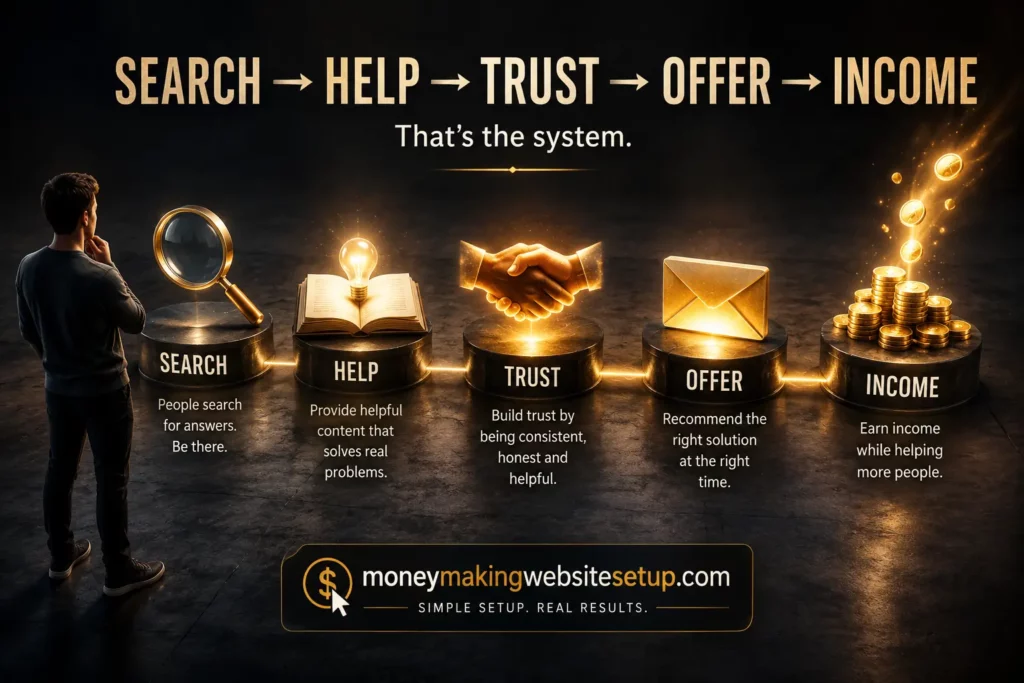
Search → Help → Trust → Offer → Income
This sequence is worth remembering because it keeps the website grounded.
Many beginners begin with the offer.
Then they try to force traffic toward it.
A stronger model starts earlier.
Search
A person reveals a need.
Help
Your content satisfies that need.
Trust
A useful experience lowers resistance.
Offer
You present a relevant next step.
Income
Some people act.
That order changes the tone of the entire website.
The site feels useful first.
Commercial second.
That is usually a healthier foundation.
How to Set Up the Website Without Getting Buried in Tech
Now we can talk about the actual setup.
Notice how little of the business depends on technical complexity.
The website exists to support the strategy.
Learn more: The Ultimate Affiliate Marketing Website Setup Guide: From Domain Name to First Commission
Step 1: Choose and Register a Domain Name
Your domain is your address online.
A good one is usually:
- easy to spell;
- easy to remember;
- reasonably short;
- relevant;
- broad enough to grow with you.
Do not spend weeks trying to find perfection.
A decent domain with strong content will outperform a brilliant domain with nothing behind it.
Step 2: Get Web Hosting
Hosting keeps the website accessible online.
You do not need to understand server architecture.
You need a provider that can handle the technical infrastructure reliably.
For beginners, look for:
- good uptime;
- reasonable speed;
- security;
- backups;
- easy management;
- responsive support.
That is usually enough.
Step 3: Install WordPress
WordPress gives you the dashboard where you manage the site.
You can:
- write posts;
- create pages;
- upload images;
- add links;
- manage menus;
- install plugins;
- adjust basic settings.
The first few times you log in, it may feel unfamiliar.
That feeling fades quickly.
You use it.
You publish.
You make small changes.
Then one day you realize you are doing things that seemed technical a month earlier without thinking about them at all.
Step 4: Pick a Lightweight Theme
For a content-driven website, your theme should make reading easy.
Look for:
- clear typography;
- good mobile behavior;
- fast loading;
- simple navigation;
- clean page structure;
- reliable WordPress compatibility.
A content website does not need visual fireworks.
The design should disappear behind the reading experience.
Step 5: Create the Essential Pages
Most sites need a handful of foundational pages.
Depending on your business and legal requirements, that may include:
- Home;
- About;
- Contact;
- Privacy Policy;
- Terms;
- disclosures.
These pages are not exciting.
But they help the site feel legitimate, transparent, and maintained.
That matters.
Step 6: Publish the First Useful Guide
This is where the project stops being theoretical.
And this is where people often start procrastinating.
They adjust colors.
Change fonts.
Redesign the header.
Rework the homepage.
Install another plugin.
Eventually, all that setup becomes a convenient way to avoid publishing.
At some point, you have to hit Publish.
The first guide will not be perfect.
It does not need to be.
It needs to help someone.
You can improve it later.
Your Website Does Not Need to Look Expensive
A polished website is nice.
A useful website is better.
Imagine landing on two pages.
One has animations, popups, slow loading, and beautiful design.
The other looks simple but immediately answers the question you searched for.
Which one do you stay on?
That is the standard that matters.
What Visitors Actually Care About
Most visitors are quietly asking:
- Am I in the right place?
- Does this answer my question?
- Can I understand it?
- Does this feel trustworthy?
- What should I do next?
Good design supports those answers.
Bad design gets in the way.
Readability Beats Decoration
Use:
- comfortable font sizes;
- clear headings;
- short enough paragraphs;
- plenty of breathing room;
- useful visuals;
- obvious links;
- simple menus.
A long guide can feel easy to read if it is well structured.
A short guide can feel exhausting if it is dense and cluttered.
Length is not the same as friction.
Mobile Matters More Than You Think
A site can look perfect on a laptop and still feel awkward on a phone.
Test it.
Look for:
- tiny text;
- buttons that are hard to tap;
- content overflowing the screen;
- intrusive popups;
- strange spacing;
- slow images.
Mobile usability is not an optional layer.
It is part of the basic experience.
Choose a Topic You Can Still Write About Months From Now
The best website topics have room.
Not endless room.
Enough room.
Look for Problems That Keep Reappearing
Evergreen niches often sit around recurring human needs:
- learning;
- building;
- fixing;
- improving;
- choosing;
- saving;
- earning;
- organizing;
- caring;
- creating.
Platforms change.
Tools change.
Human needs are slower to change.
That is one reason evergreen content can remain useful for years.
Test the Depth Before You Commit
Ask:
Could I create 50 genuinely useful articles around this topic?
If yes, good.
Could you create 100?
Even better.
If the idea dries up after a handful of posts, either the topic is too narrow or you have not mapped it deeply enough yet.
Make Sure There Is a Commercial Connection
You do not need to turn every article into a sales page.
But the audience should ideally have problems connected to products or services.
Maybe they buy:
- software;
- tools;
- equipment;
- memberships;
- training;
- templates;
- plans;
- services;
- subscriptions.
Commercial potential simply means there is a natural next step available when a reader wants more help.
Stop Thinking in Individual Blog Posts
Think in clusters.
Think in relationships.
Think about what a reader is likely to need next.
Suppose your main subject is helping beginners build websites.
You might create a cluster around:
Website Setup
- domains;
- hosting;
- WordPress;
- themes;
- plugins;
- site structure.
Another around:
SEO
- keywords;
- search intent;
- indexing;
- rankings;
- on-page optimization;
- internal linking.
Another around:
Content
- article ideas;
- outlines;
- useful content;
- updating old posts;
- topical coverage.
Another around:
Traffic
- Google;
- Pinterest;
- email;
- referrals.
Another around:
Monetization
- affiliate marketing;
- email funnels;
- digital products;
- advertising;
- services.
Now the site starts to feel like a connected resource instead of a pile of unrelated posts.
That helps readers.
It also helps search engines understand the relationships between topics.
Your First 10 Articles Should Feel Like They Belong to the Same Website
For example:
- How to Build a Money-Making Website for Beginners
- How to Choose a Profitable Website Topic
- How to Choose a Domain Name
- Beginner’s Guide to Web Hosting
- How to Install WordPress
- Best Website Structure for Beginners
- How to Find Your First Keywords
- How to Write Your First SEO Article
- How Google Discovers a New Website
- Beginner Ways to Monetize Website Traffic
Each guide answers a specific question.
Together, they form a journey.
That is where internal linking becomes natural.
One article leads to the next because the reader’s question leads there.
Monetization Works Better When the Website Does Not Feel Like a Pitch
The phrase “money-making website” can trigger the wrong instinct.
People assume they need more banners.
More affiliate links.
More buttons.
More selling.
Usually, the stronger approach is the opposite.
Help first.
Monetize second.
Give the Reader the Answer Before the Offer
If someone came for information, give them the information.
Do not make them fight through a sales message to reach the useful part.
That builds trust faster.
And when you do recommend something later, the recommendation feels more credible.
Give Interested Visitors a Reason to Stay Connected
Most search visitors leave.
That is normal.
They came for an answer.
They got it.
Email gives the most interested readers a way to continue.
You might offer:
- a checklist;
- a blueprint;
- a resource list;
- a template;
- a guide;
- a tutorial;
- downloadable reference material.
The free resource should connect naturally to the page they were reading.
That is what makes the opt-in feel useful instead of random.
Email Gives the Relationship More Time
One pageview is not much time.
Email changes that.
You can continue helping.
Answer objections.
Explain common mistakes.
Recommend resources.
Introduce relevant tools.
Share related content.
And eventually, when the timing is right, present an offer.
That is a much more natural path than expecting a stranger to buy immediately.
How Can a Beginner Website Actually Make Money?
There is no single monetization model that fits every site.
The right one depends on the audience, topic, traffic, and offer.
Affiliate Marketing
You recommend a relevant product or service using an affiliate link.
If a visitor makes an eligible purchase, you may earn a commission.
The advantage is that you do not have to create the product yourself.
The challenge is relevance.
The offer has to make sense.
Email Marketing
Email itself is not a monetization model.
It is the bridge.
A visitor finds your article.
Joins your list.
Receives useful follow-up content.
Builds familiarity.
Eventually sees a relevant offer.
That sequence can be far more effective than relying on a single website visit.
Digital Products
You can create and sell:
- ebooks;
- courses;
- templates;
- printables;
- plans;
- memberships;
- digital tools.
The upside is control.
The downside is responsibility.
You create the product.
You support it.
You improve it.
Display Advertising
Ads can monetize traffic without requiring every visitor to buy.
This model usually becomes more interesting as the website attracts larger traffic volumes.
For some sites, it works well as an additional revenue stream rather than the only one.
Services
A website can also bring in clients.
Depending on the niche, that may include:
- consulting;
- writing;
- design;
- coaching;
- freelancing;
- local services;
- professional services.
This model may need far less traffic because one customer can be worth significantly more.
What Changes When You Publish 10, 50, or 100 Useful Guides?
The site stops feeling small.
Not because the design changed.
Because the number of opportunities changed.
One article can rank for a set of searches.
Ten articles create more opportunities.
Fifty create more again.
A hundred useful guides can cover a remarkable amount of ground within a niche.
That does not mean every article will rank.
They will not.
It does not guarantee traffic.
It does not guarantee revenue.
But every strong page adds another possible entrance.
Think of Every Guide as Another Door
Imagine a building with one entrance.
If nobody walks past that door, nobody comes inside.
Now imagine the same building with doors facing multiple streets.
That is roughly what happens when you create useful content around different search intents.
Each page can attract a different type of visitor.
Some pages may barely move.
Others may surprise you.
You often do not know which ones will become important until the site has been online long enough to collect real search data.
Older Content Keeps Existing While You Create New Content
This is one of the quiet advantages of evergreen publishing.
You write something today.
Another piece next week.
Another next month.
The older pages remain.
They can be crawled.
Indexed.
Linked.
Updated.
Improved.
Discovered.
The work accumulates.
That does not make the business magical or passive.
But it means the value of yesterday’s work does not automatically disappear when you start tomorrow’s.
You are building a library.
What If You Publish and Nobody Seems to Care?
This part can feel brutal.
You launch the site.
Publish a guide.
Check your analytics.
Nothing.
Publish another.
Still almost nothing.
It can feel like you are speaking into an empty room.
But new websites often begin quietly.
Search visibility takes time to develop.
Impressions Can Arrive Before Clicks
One of the first signs of movement may be impressions.
Your page starts appearing in search results.
Maybe far down the rankings.
Maybe too low to get clicks.
That can feel meaningless.
It is not.
An impression tells you that the page has been discovered and associated with a query.
Now you have information.
You can see what the search engine thinks the page is relevant to.
You can improve the article.
Strengthen internal links.
Expand topical coverage.
Keep building.
Rankings Move
Search positions are not permanent.
Pages rise.
Pages fall.
Search engines recrawl.
Competitors change.
Search intent evolves.
Your own site grows.
That is why the first few weeks rarely tell the full story.
But patience should not become passivity.
If months go by and there is no meaningful movement, investigate.
Look at:
- indexing;
- search intent;
- competition;
- content quality;
- site structure;
- internal linking;
- technical accessibility;
- topical focus.
Persistence matters.
So does adjustment.
The Minimum Viable Money-Making Website Is Smaller Than Most People Think
If all of this still feels like too much, reduce it again.
Website Foundation
- Domain
- Hosting
- WordPress or another suitable platform
- Lightweight design
- Essential pages
Content Foundation
- Clear audience
- Clear topic
- Helpful search-focused guides
- Related content clusters
- Natural internal links
Traffic Foundation
- One main traffic source
- Basic tracking
- Continued publishing and improvement
Email Foundation
- Relevant opt-in
- Useful free resource
- Welcome emails
- Ongoing follow-up
Monetization Foundation
- Relevant product or service
- Clear connection between problem and solution
- Appropriate disclosures
- Simple conversion path
That is enough to begin.
Not enough to perfect everything.
Enough to move.
The Real 80/20 Rule Is Simpler Than Most SEO Advice
A large part of successful website building comes back to a few repeated actions.
Understand what people need.
Create something genuinely useful.
Make it discoverable.
Connect it to related information.
Give interested readers a next step.
Repeat.
Everything else is refinement.
Better headlines.
Better design.
Better email.
Better SEO.
Better conversion rates.
Better tools.
Useful, yes.
But none of those things matter much if the core engine is missing.
Frequently Asked Questions Beginners Often Ask Themselves Before They Start
“What if I’m terrible with computers?”
You can still build a website.
You will need to learn basic tasks such as publishing posts, uploading images, managing WordPress, adding links, and handling your hosting account.
That is normal.
The first time feels technical.
After enough repetition, most of those tasks become ordinary.
“Do I really not need to know code?”
For many content-based websites, no.
You can manage WordPress, publish articles, create menus, install plugins, add images, and run the site without coding.
Learning basic HTML or CSS may help later.
It is not a prerequisite.
“Is WordPress going to overwhelm me?”
Possibly at first.
Anything unfamiliar can feel more complicated than it really is.
You do not need to learn the whole platform.
Start with the small group of tasks you use most:
- posts;
- pages;
- images;
- links;
- navigation;
- plugins;
- updates;
- basic settings.
That is enough to get moving.
“How much money do I need to start?”
It depends on the tools you choose.
At minimum, you will usually need a domain and hosting.
Costs rise if you add premium themes, advanced SEO software, paid email platforms, outsourced services, or advertising.
Start lean.
Spend when the tool solves a real problem.
“What should my first article be about?”
Choose a fundamental question your audience genuinely needs answered.
Do not worry about finding the perfect keyword.
Start with something useful.
Something that helps establish what the website is about.
Something you can answer well.
“How many articles do I need before Google sends traffic?”
There is no magic number.
Search visibility depends on many factors, including:
- competition;
- search intent;
- content quality;
- indexing;
- authority;
- site structure;
- internal linking;
- time.
Think in terms of useful topical coverage rather than chasing a number for its own sake.
“How quickly can a new website rank?”
Some pages may start appearing in search fairly quickly.
Meaningful rankings may take longer.
Competitive queries are usually harder.
Specific long-tail questions may be easier.
Track more than traffic.
Watch:
- indexing;
- impressions;
- search queries;
- average positions;
- clicks.
Those signals can show progress before traffic becomes substantial.
“Do I need social media?”
Not necessarily.
Social media can help.
So can Pinterest, YouTube, referrals, partnerships, and paid traffic.
But you do not need to master all of them.
One strong traffic channel can be enough to build the foundation.
“Can I make money without thousands of visitors?”
Potentially, yes.
It depends on visitor intent, niche, offer relevance, conversion rates, and the value of each customer.
A service-based website may need far fewer visitors than a website relying on display advertising.
The quality of the traffic matters.
“Can I build this part-time?”
Yes.
A content website can be built gradually.
The key is finding a publishing pace you can sustain.
Consistency over a long period is usually more useful than an intense burst followed by months of inactivity.
“What if my first website doesn’t work?”
Then you have data.
Maybe the topic was too competitive.
Maybe the content missed the intent.
Maybe the monetization did not fit.
Maybe there was not enough traffic.
Maybe you stopped too early.
Maybe the execution needs work.
Whatever the reason, you carry the lessons forward.
That experience has value.
“Is building a content website still worth it?”
It can be.
But the strongest approach is not to publish generic content and hope for traffic.
Build something genuinely useful.
Cover the topic deeply.
Develop a direct relationship with readers.
Create multiple ways for people to discover your work.
And build monetization that fits the audience rather than fighting against it.
Recommended reading: Topical Authority Website Setup Strategy 2.0: The Entity-Driven SEO System Built for AI Search, Featured Snippets, and Generative Engines
Products / Tools / Resources
A beginner does not need a giant technology stack.
A small collection of dependable tools is usually enough.
WordPress
WordPress remains one of the most practical choices for content-focused websites. It gives you control over your site while allowing you to publish and manage content without manually coding every page.
A Reliable Web Host
Choose hosting that keeps the technical side simple. Look for dependable uptime, reasonable speed, automatic backups, security features, and support that can help when you get stuck.
A Lightweight WordPress Theme
Use a theme that prioritizes readability, speed, mobile responsiveness, and clean design. Your theme should support the content rather than compete with it.
Google Search Console
Search Console is one of the most useful free tools for understanding how Google sees your website. It can show indexing status, impressions, search queries, clicks, and ranking trends.
Google Analytics
Analytics helps you understand what people do after they arrive. You can see which pages attract visitors, how traffic moves through the site, and which content appears to hold attention.
An Email Marketing Platform
If email is part of your strategy, use a platform that makes subscriber management, welcome emails, follow-up sequences, and basic automation easy to handle.
A Simple Keyword Research Process
You do not necessarily need expensive keyword software in the beginning. Google autocomplete, related searches, competitor pages, Search Console data, and real audience questions can reveal a large number of content opportunities.
A Content Planning Spreadsheet
A simple spreadsheet can become one of the most useful tools in the entire system. Track article ideas, target queries, clusters, publication dates, and internal linking opportunities so the site grows intentionally rather than randomly.
A Backup Solution
Make sure your website can be restored.
Automatic backups are boring until the day you need one.
Then they become one of the most valuable tools you have.
A Password Manager
As the site grows, so will the number of logins: hosting, WordPress, email, analytics, affiliate accounts, tools, and services. A reputable password manager helps you keep strong, unique passwords without relying on memory.
Your Own Search Data
Once your site has been online long enough to collect data, your own numbers become more valuable than generic advice.
Search queries.
Impressions.
Ranking changes.
Clicks.
Subscriber growth.
Conversions.
That information tells you what your actual audience is responding to.
And eventually, that is the resource you will trust most.